![S_Icon_03.png]](https://support.swimmingly.app/hs-fs/hubfs/S_Icon_03.png?height=50&name=S_Icon_03.png)
What Are Meet Entry Deadlines?
Meet Entry Deadlines create a required date and time for participating teams to finish entering their swimmers into the meet.
Once the deadline is reached, ALL teams will either be:
- Automatically be marked as Heat Sheet Ready (recommended)
- Manually marked as Heat Sheet Ready by the host team
This helps the host team know when it is safe to merge heat sheets and move into final meet preparation.
Why Use Meet Entry Deadlines?
Meet Entry Deadlines help:
- Create a clear expectation for when entries must be complete
- Reduce last-minute entry changes
- Allow the host team to merge heat sheets earlier
- Give teams time to print heat sheets and prepare volunteers
- Keep meet setup more organized and predictable
This can be especially helpful for larger meets or teams coordinating across multiple clubs.
Automatic vs Manual Heat Sheet Ready
Choose how teams become Heat Sheet Ready once the Meet Entry Deadline is reached.
-
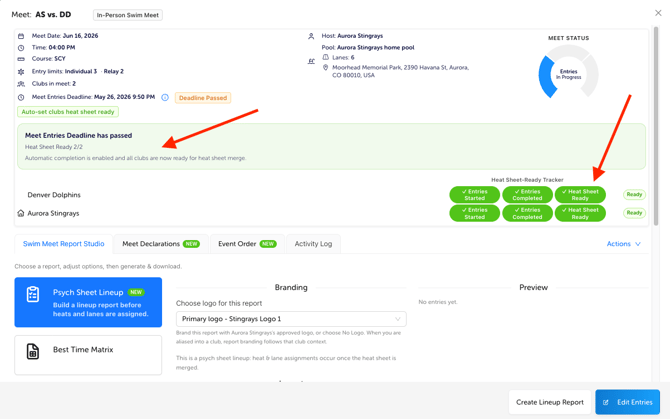
Automatic (Recommended): Teams are automatically marked Heat Sheet Ready at the deadline. Best for most meets and faster heat sheet merging.
-
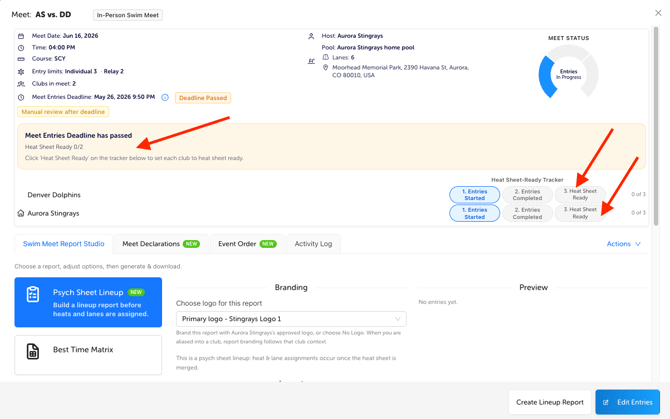
Manual: Teams remain unchanged after the deadline until a host team admin manually marks them Heat Sheet Ready. Best if you need final entry review or expect late changes.
How Do I Set Up a Meet Entry Deadline?
During Meet Creation
When creating your meet, you’ll have the option to:
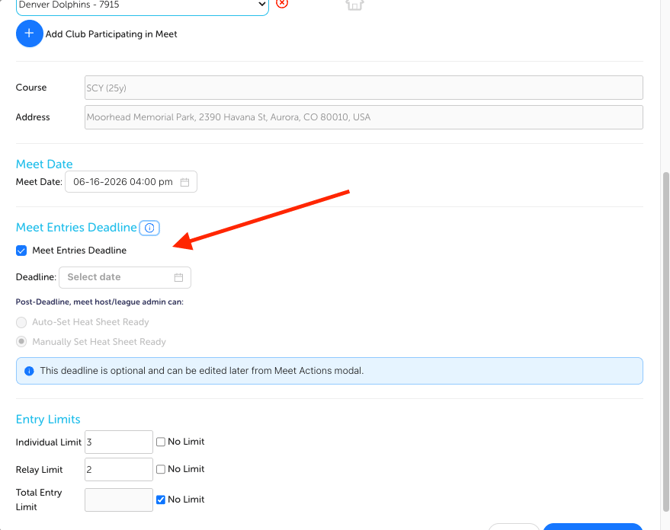
- Set a Meet Entry Deadline (date and time).
- Choose how teams should become Heat Sheet Ready:
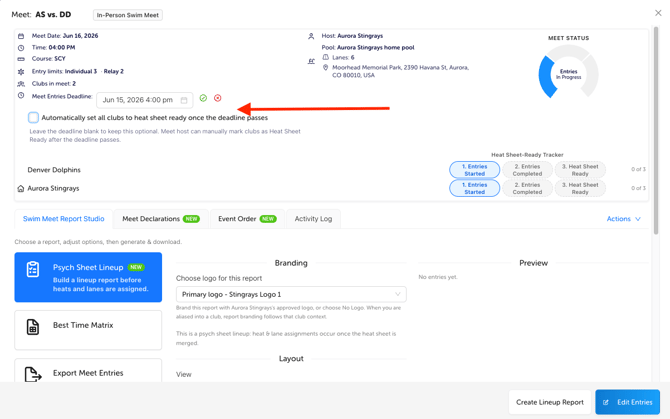
- Automatically mark teams as Heat Sheet Ready after the deadline has passed (Recommended)
- Admin from the host team can manually mark teams as Heat Sheet Ready after the deadline has passed
Update a Meet Entry Deadline After the Meet Has Been Created
Need to make a change? No problem.
Editing the Meet Entry Deadline works the same way as editing other meet details (like Meet Name, Date, or Location).
- Open the Meet in Clubhouse under your Meet Schedule Tab.
- Locate the Meet Entry Deadline information displayed within the meet.
- Hover over the deadline field until the Edit (pencil) icon appears.
- Click the Edit icon.
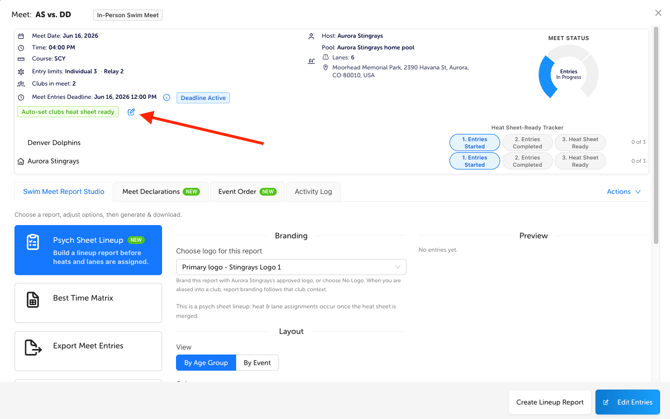
- Update, remove, or add the deadline and adjust the Heat Sheet Ready setting if needed.
- Click:
- Green checkmark to save
- Red X to cancel changes
Once the Deadline Is Set
- All participating teams will be able to view the deadline.
- Teams should complete entries before the deadline passes.
- If Automatic is selected, teams will automatically be marked as Heat Sheet Ready once the deadline is reached.
- If Manual is selected, an admin from the host team must still manually mark each individual team as Heat Sheet Ready from the meet info screen.
Recommended Setup
As a general guideline, we suggest setting the deadline:
24 hours before meet start time
Your exact timing may vary depending on meet size and team preferences.
Important: Communicate With Opposing Teams
Meet Entry Deadlines are visible to all participating teams, but because this is a newer feature, it may not always be noticed.
We strongly recommend confirming the deadline directly with your opponent before meet day to make sure everyone is aligned.
Swimming Against a Non-Swimmingly Team?
Meet Entry Deadlines are also helpful when competing against teams that do not use Swimmingly.
You can still use this workflow to manage readiness and automatically mark their team as heat sheet ready, helping keep your meet preparation process consistent.
Pro Tip: Start with Automatic Heat Sheet Ready for your first few meets. Most teams will find it saves time and makes heat sheet preparation significantly easier.