![S_Icon_03.png]](https://support.swimmingly.app/hs-fs/hubfs/S_Icon_03.png?height=50&name=S_Icon_03.png)
As a:
Club Admin
I Want To:
Download the Meet Declarations report for an upcoming meet, so that I know who is/is not attending
Solution: Navigate to an upcoming swim meet on your Meet Schedule to view and download the Meet Declarations report!
Step 1: Log into your Club Admin account in the Swimmingly® Clubhouse
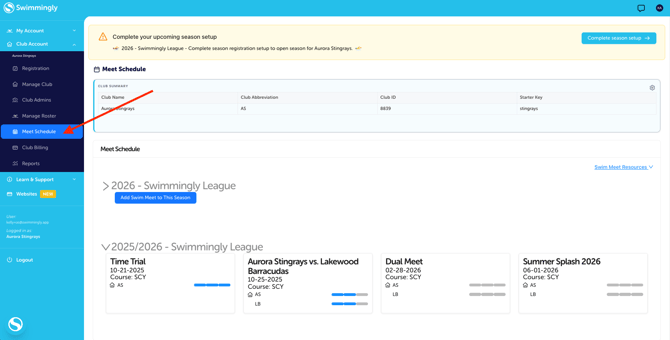
Click on the Meet Schedule tab
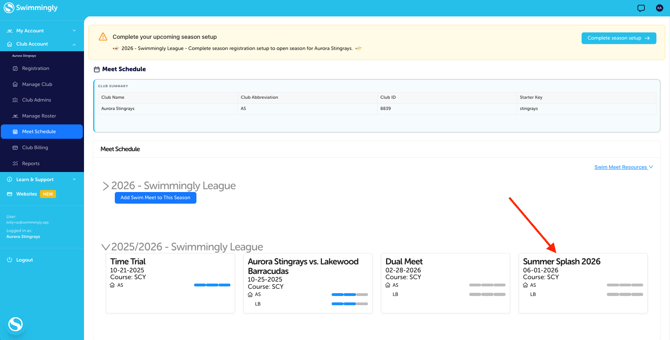
Step 2: Select the upcoming meet on your Meet Schedule
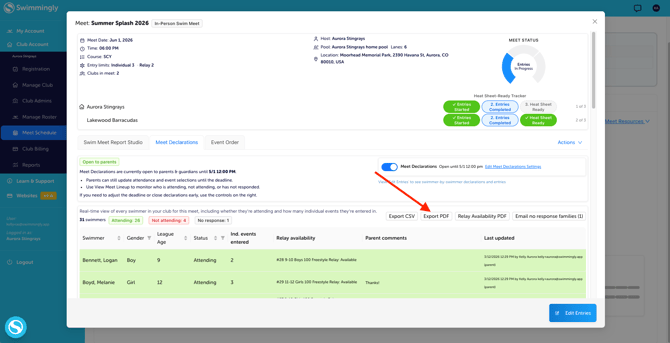
Step 3: Select Export PDF
On this screen you can also see the meet declarations without needing to export the PDF or CSV. You'll be able to see the parent's comments, relay availability, declaration, as well as when the declaration was last updated and by whom.
TIP: You can also see who is attending/not attending/has not responded yet on the same screen. Or you can choose to export in a CSV file.
Please note: You as the Club Admin can make any necessary edits to these options after the Meet Declarations have been opened. You can also make edits to the meet entries after Meet Declarations have been submitted by the parent/guardian.
For instructions on how a Parent can complete Meet Declarations, click here