![S_Icon_03.png]](https://support.swimmingly.app/hs-fs/hubfs/S_Icon_03.png?height=50&name=S_Icon_03.png)
What Is Circle Seeding?
Circle seeding places the fastest swimmers across the last three heats of an event rather than grouping them all into one heat.
Here’s how it works:
- The fastest swimmer is placed in the fastest (center) lane of the last heat
- The second fastest swimmer is placed in the fastest lane of the second-to-last heat
- The third fastest swimmer is placed in the fastest lane of the third-to-last heat
- This pattern continues, distributing top swimmers evenly across the final 3 heats
This ensures that multiple heats remain competitive, not just the final one.
When Is Circle Seeding Used?
Circle seeding is most commonly used in:
- Prelim–final meets (typically only during prelims)
- Higher-level or championship-style competitions
- Prevents all top swimmers from being grouped into one heat (for prelims and finals)
- Gives swimmers in different heats a fair opportunity to swim against the top seeds and potentially qualify for finals
- Creates a more balanced and exciting meet experience
How Circle Seeding Works in Swimmingly
Circle seeding is not enabled by default in Swimmingly. It must be intentionally set up when creating your meet.
To use circle seeding, your meet must be configured using the following settings:
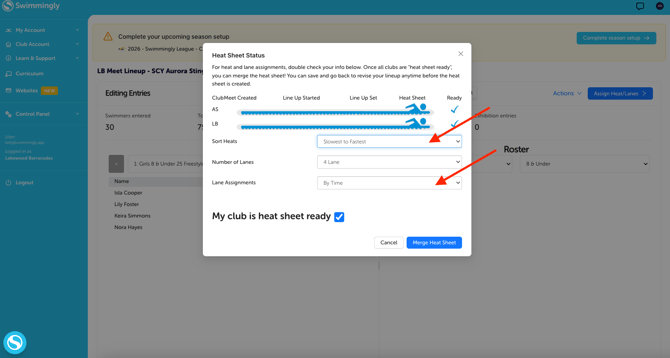
- Seeded slowest to fastest
- Lane assignments based on time (not fixed lanes)
If these settings are not selected, you will not have the option to use circle seeding.
How do I Use Circle Seeding in Swimmingly?
- Complete your meet setup and entries as usual.
- When marking your team as heat sheet ready, make sure to seed heats slowest to fastest and make the lane assignments based on time.
- Once the heat sheet is merged, click the "actions" button in the top right corner and then click "Circle Seeding".
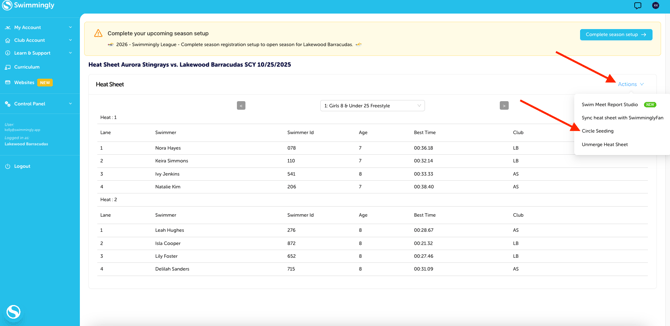
If you accidentally click on Circle Seeding, but you don't want to seed your meet that way, just unmerge the heat sheet and remerge the heat sheet.