![S_Icon_03.png]](https://support.swimmingly.app/hs-fs/hubfs/S_Icon_03.png?height=50&name=S_Icon_03.png)
Step 1: Log into the Swimmingly® Clubhouse
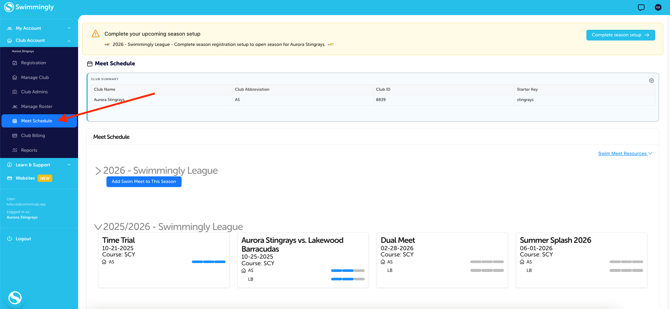
Go to the Meet Schedule tab
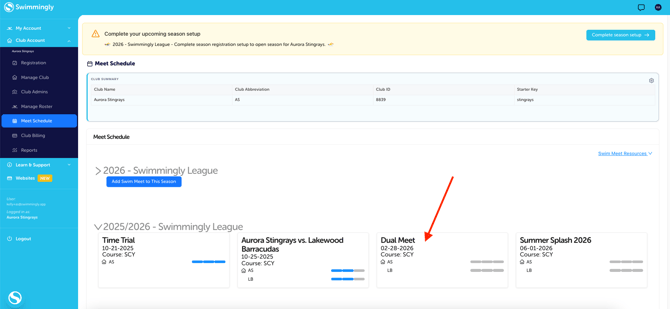
Step 2: Select the Meet
Click into the meet you would like to delete
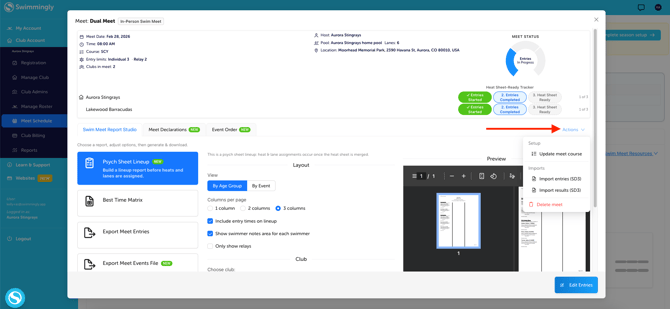
Step 3: Open Actions
On the right-hand side, hover over the Actions button
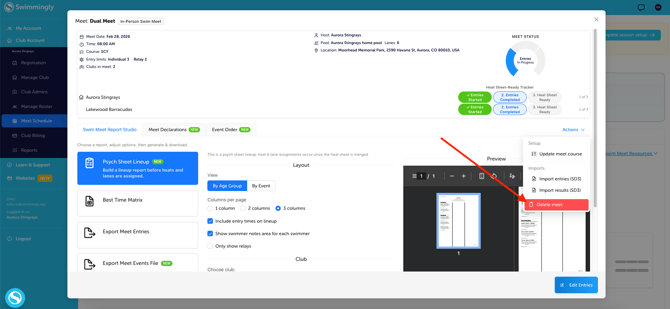
Step 4: Delete the Meet
Click Delete Meet
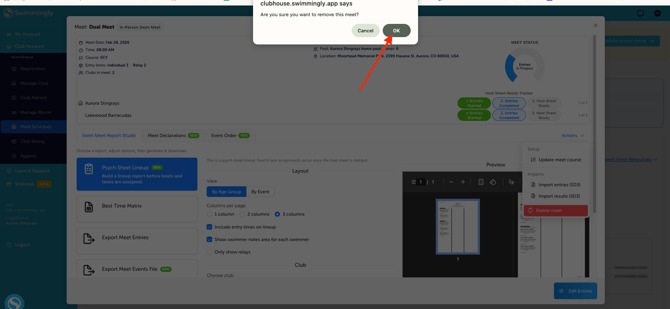
Step 4: Confirm You Want to Delete the Meet
Click OK
Important Notes
- Meets can only be deleted if results have not been published
- If results have already been published, please contact team@swimmingly.app for assistance
- Deleting a meet will also remove:
- Meet entries
- Meet declarations
Before deleting a meet, confirm with the opposing team(s) (if they are also using Swimmingly) that they have not started working on entries or opened declarations. When you delete the meet it will also delete the meet from the opposing team's meet schedules as well (along with any of their declarations or entries).
Need Help?
If you have questions or need assistance with a deleted meet, please reach out to Swimmingly Support at team@swimmingly.app