![S_Icon_03.png]](https://support.swimmingly.app/hs-fs/hubfs/S_Icon_03.png?height=50&name=S_Icon_03.png)
The Swimmingly® Clubhouse supports exporting meet results in the following file formats: SD3, CL2, and/or HY3.
Other systems that may support these file formats include:
- TeamUnify Touchpad
- SwimTopia Meet Maestro
Step 1: Log into your Club Admin account in the Swimmingly® Clubhouse
Click on the Meet Schedule tab
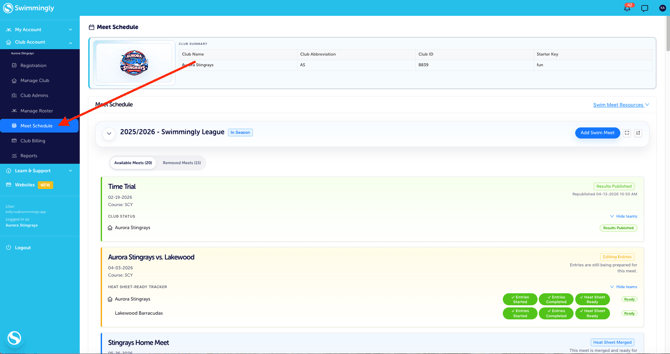
Step 2: Locate your swim meet (with results) and click on the Meet box

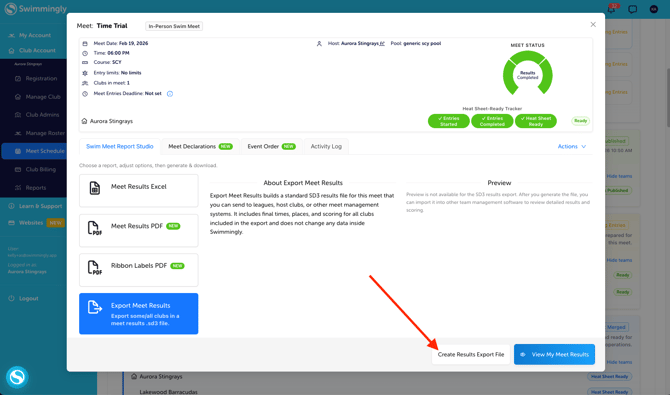
Step 3: Select "Export Meet Results"

* if you don't see this as an option, please contact team@swimmingly.app to request this feature be enabled for your team.
Step 4: Select "Create Results Export File"
Step 5: Confirm your Export Format & LSC/Team Codes

Once you've confirmed your codes are correct, select whether you would like to export results for only your club or if you want to export results for all of the clubs in the meet. Then click okay to download the file.
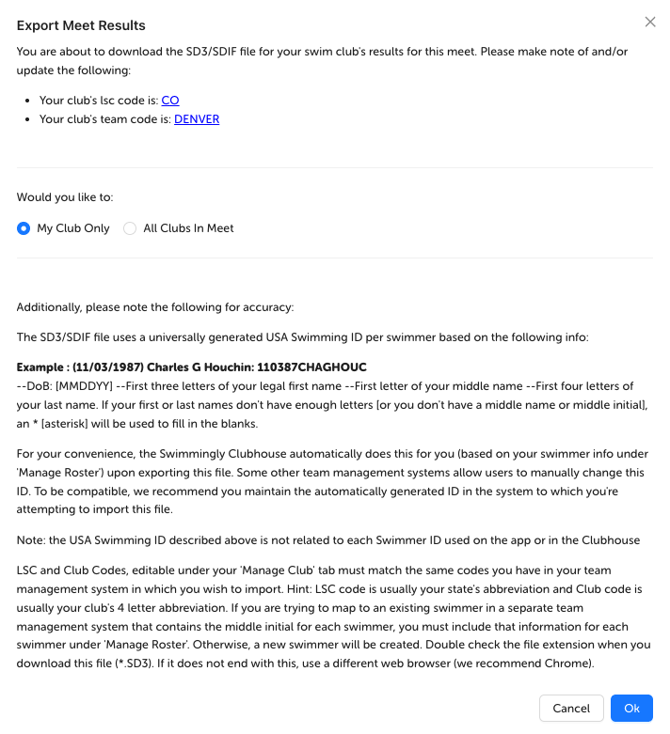
*If you need to edit your LSC code and/or your Team Code, please go to the Manage Club tab, click on file integration to update your code(s), and click the checkmark to save.

Please make sure that your LSC and Team Codes in the file you export (available to edit under your Manage Club tab, and also, at the time you export) match the LSC and Team Code in the software system you are importing the file into.
Please note: This "transfer file process" relies on the the file exchange between pieces of software. Swimmingly® is compatible with the SDIF (.SD3), HY3, and CL2 file specifications, but we are unable to verify compatibility with other systems because verification between Swimmingly and the final destination of the file is not possible. We fully support any questions around the file we provide, but we cannot provide support/troubleshooting for other software systems.
Our standing recommendation to other swim software companies is cooperation around an open API between software platforms to provide a better experience to swim team/meet admins.