![S_Icon_03.png]](https://support.swimmingly.app/hs-fs/hubfs/S_Icon_03.png?height=50&name=S_Icon_03.png)
The Swimmingly® Clubhouse supports exporting meet event order file in the .HYV or .EV3 file formats as well as a standard CSV.
Other systems that may support HYV/EV3 file formats include:
- TeamUnify Touchpad
- SwimTopia Meet Maestro
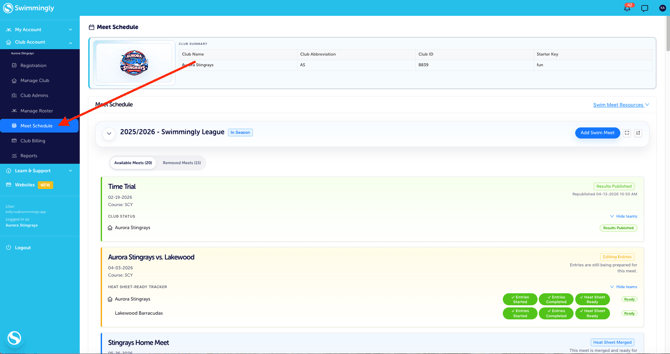
Step 1: Log into your Club Admin account in the Swimmingly® Clubhouse
Click on the Meet Schedule tab
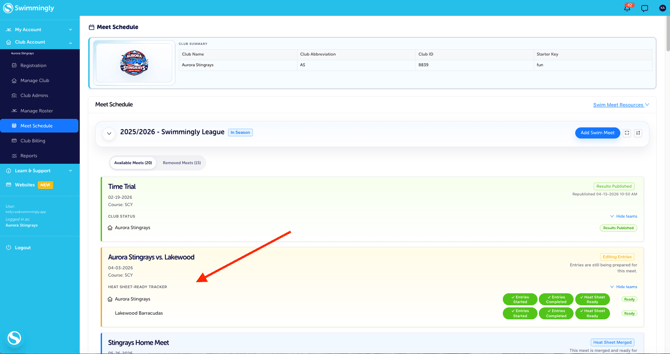
Step 2: Locate your swim meet and click on the Meet box
Step 3: Select "Event Order"

Step 4: Select the icon on the far right side "Export Meet Events"

Step 5: Determine if you want the .HYV, .EV3 or the CSV file

Step 6: If you choose the .HYV or .EV3 file formats - fill out the required Meet Details information
*NOTE: This is standard practice for this type of file. It will require you to choose your age up date (the date in your season where swimmers ages are "locked in"). Typically this is a specific date like June 1st of that year OR the day of the meet.
