![S_Icon_03.png]](https://support.swimmingly.app/hs-fs/hubfs/S_Icon_03.png?height=50&name=S_Icon_03.png)
As a
Club Admin
I want to
Print out my team's roster so that we can view who registered for this season and their Swimmer ID #'s
Solution:
Go to the Manage Roster tab to download your team's roster
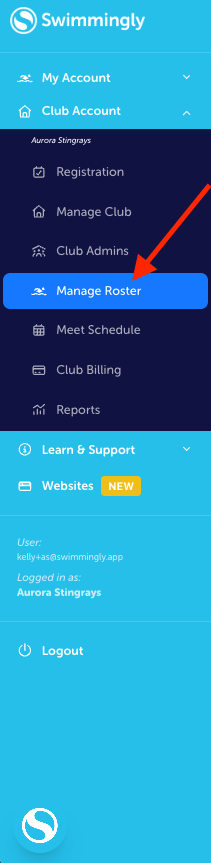
Step 1: Log into your Club Admin account in the Swimmingly® Clubhouse
Click on the Manage Roster tab
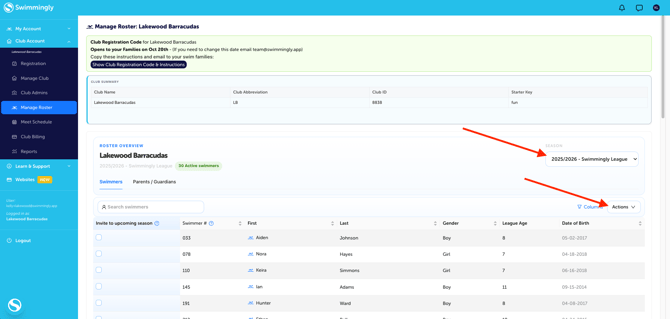
Step 2: Select your Season from the drop-down menu > Select the "Actions" menu
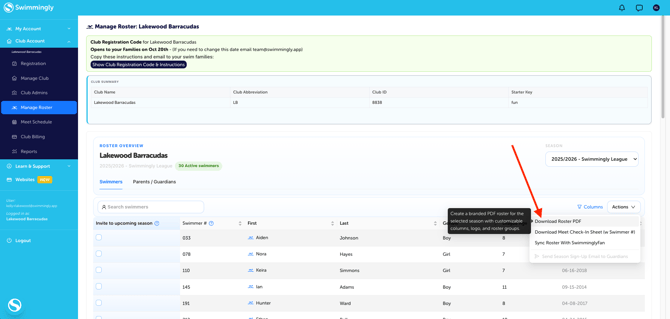
Step 3: Select"Download Roster PDF"
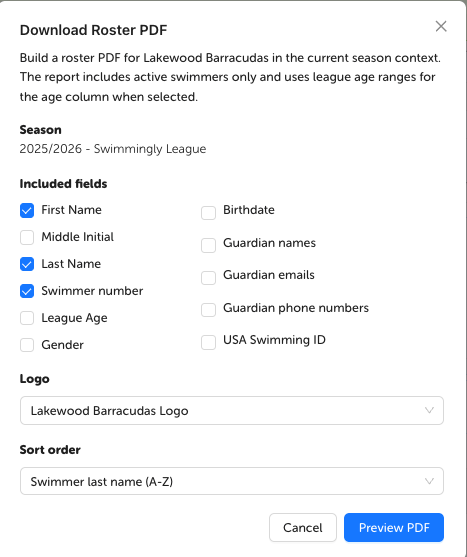
Step 4: Customize the report
Options include: First name, last name, middle initial, swimmer number, league age, gender, birthdate, guardian names, guardian emails, guardian phone numbers, and USA Swimming ID.
You can also add your logo to the report and determine the sorting order.
You have now downloaded your team's roster. You can see the count/number of swimmers on your roster directly under the season, in green.